


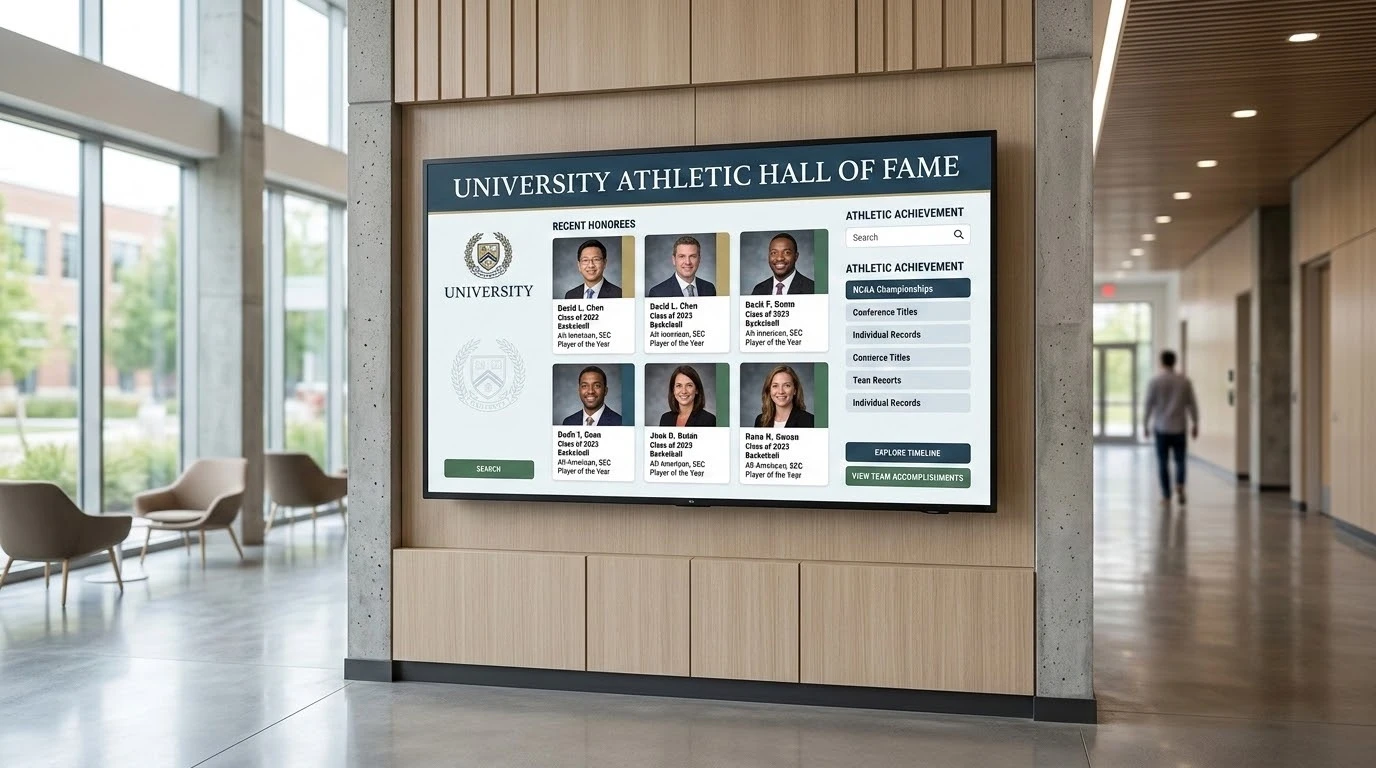
Walk into almost any established high school, university athletic center, or nonprofit lobby, and you will see the same operational problem. The glass cabinets are full. Trophies are crammed together, plaques are overlapping, and brass donor plates have simply run out of wall space.
When a facility runs out of room, the traditional response was to order another bulky display case. That uses up valuable square footage and creates a maintenance headache. Finding a specific name from 1984 becomes an impossible task for visitors. Today, facilities are swapping out static glass for interactive digital displays. A digital setup saves space and actually lets people search for specific alumni, read donor stories, and watch video highlights.
But picking the right system takes some careful filtering. The market is full of software platforms, hardware vendors, and digital agencies. Finding a reliable vendor means understanding exactly what your organization has the bandwidth to manage. Here is a look at five reliable options for moving past the crowded glass cabinet.
1. Touchstone Digital Solutions
When an institution wants a lobby centerpiece that looks like it belongs to them rather than a generic tech vendor, a custom approach makes sense. A common frustration with digital signage is buying the hardware and then realizing you’ve got to design the interface from a blank screen. Touchstone Digital Solutions handles the entire build process.
They design the visual identity, set up the content management system, and structure the honoree content specifically around a school’s history. This is a purpose-built system. The team focuses entirely on recognition displays like donor walls and athletic halls of fame, rather than treating them as an afterthought in a broader corporate signage package.
The backend CMS is accessible for staff members who aren’t graphic designers, meaning updates are simple to execute once the system is live. You get a dedicated support model rather than being handed a login and left to figure it out.
- Best fit for: Institutions wanting a fully custom-branded display built from the ground up
- Deployment style: Fully managed custom build
- Notable strength: Custom design combined with dedicated ongoing support
- Use cases: Athletic hall of fame, donor recognition, and team tribute walls
2. Digital-Trophy-Case.com
Some facilities just want a straightforward hardware and software package ready to go out of the box. This company provides interactive touchscreen kiosks generally ranging from 43 to 65 inches. The focus here is heavily on the physical kiosk hardware paired with a searchable directory.
If your primary goal is letting visitors walk up and easily search through an alphabetical list of honorees or donors without needing a deeply customized narrative experience, this fixed-package route is highly practical. You get a cloud-managed system that handles the basics efficiently.
It’s worth noting that this offering is centered on the hardware. Institutions wanting rich video biographies, complex historical timelines, or a fully branded interactive experience might find the standardized format a bit restricted. But for organizations that just need a reliable, searchable screen in the hallway, it works well.
- Best fit for: Organizations wanting a standardized, searchable touchscreen kiosk
- Deployment style: Managed kiosk and software package
- Notable strength: Cloud-managed profiles that are easy for users to search
- Use cases: Donor walls and standard recognition directories
3. Norvision
Giving programs require very specific handling. Managing donor tiers, tracking capital campaigns, and highlighting philanthropic impact is a different operational challenge than just listing athletic statistics. Norvision builds interactive displays specifically targeted at donor recognition.
Their software is built to scale for both small local giving programs and massive university capital campaigns. The focus is intentionally narrow. The goal is to help organizations transform how they connect with supporters through interactive storytelling.
If you need a unified system to handle both a donor wall and a sports hall of fame, you might have to look elsewhere or manage two separate software platforms. But for pure donor recognition, the focused toolset provides the specific features development offices need to manage complex giving data.
- Best fit for: Organizations of any size focused strictly on giving programs
- Deployment style: Managed donor recognition platform
- Notable strength: Scales effectively for complex giving campaigns
- Use cases: Dedicated donor recognition walls
4. PandaSuite
Sometimes a school or nonprofit has a highly capable internal creative team that wants complete control over how the display functions. PandaSuite is a no-code interactive display builder that lets non-technical teams build kiosk experiences from scratch.
This is essentially a blank canvas. It’s a general-purpose builder used across many industries. It is not built specifically for institutional recognition, so your staff has to design the honoree structure, figure out the donor tiers, and build the navigation logic themselves.
The flexibility is massive if you have the time and personnel to manage the ongoing content design. Pricing starts at a reasonable monthly rate, but the true cost is the internal labor required. You’re responsible for the ongoing content upkeep, which makes this a better fit for organizations with dedicated digital staff.
- Best fit for: Internal teams wanting hands-on creative control
- Deployment style: Self-managed no-code platform
- Notable strength: Complete drag-and-drop design flexibility
- Use cases: General interactive displays and internally built halls of fame
5. Rise Vision
A lot of schools already use digital signage for hallway announcements, lunch menus, and emergency alerts. Rise Vision is a cloud signage platform that includes basic hall of fame and donor wall templates among its massive library of over 750 general-purpose designs.
This route is cost-effective and provides instant updates across multiple devices. The trade-off is the depth of the visitor experience. The templates are standard and relatively basic. An out-of-the-box template from a broad signage company will look noticeably different than a dedicated build from Touchstone Digital Solutions, but if you just need a simple, low-cost way to get names on a screen quickly, it gets the job done.
Because recognition boards are just one small template category within a much broader communication product, the customization options are limited. Still, for budget-conscious schools wanting to leverage their existing screens, it’s a highly logical starting point.
- Best fit for: Organizations wanting simple, instant updates across multiple campus screens
- Deployment style: Cloud signage platform
- Notable strength: Easy updates from any device and broad campus integration
- Use cases: Basic donor boards and simple hall of fame screens
Hardware and Installation Realities
Upgrading from physical cases to digital screens is not just a software decision. The physical environment dictates a lot of the project scope. Facilities teams need to plan for power and data drops early in the process. You can’t just hang a commercial touchscreen on drywall and run an extension cord down the hall.
Commercial-grade screens run much brighter than standard consumer televisions and are built to handle running for twelve to sixteen hours a day. Touch overlays require regular cleaning, and depending on the location, the screen might need a protective enclosure to survive a busy high school corridor. Understanding the total cost of ownership means looking at the software subscription, the initial hardware purchase, and the physical installation requirements together. Finding the right partner means balancing all three of those factors with the actual daily needs of your organization.

